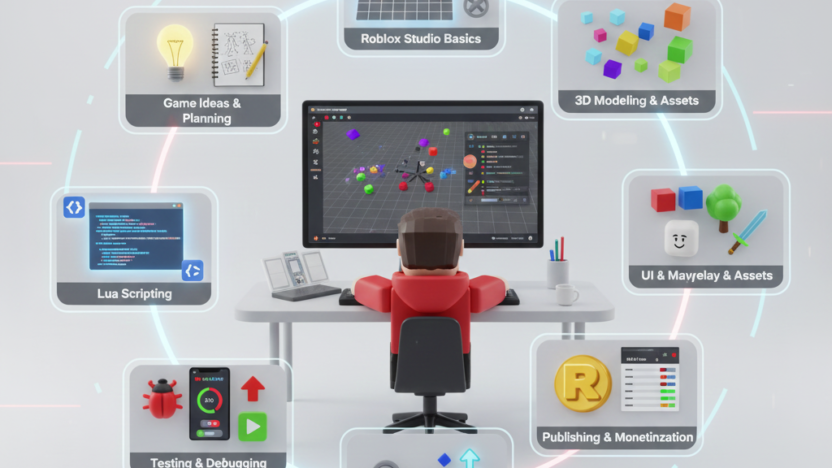
Roblox game development allows creators at every skill level to make interactive worlds, fun games, and experiences with the help of the Roblox Studio platform. Coupled with intuitive building tools, Lua scripting, and a rich library of assets, developers are able to bring their ideas into reality and share them with millions of other players around the world.
Be it adventure games, simulations, obstacle courses, or role-playing experiences, Roblox nurtures creativity and experimentation. It supports collaboration, monetization, and community engagement, creating an ideal space for aspiring developers to learn real game design principles. Roblox game development continues to grow as a powerful gateway into the gaming industry.
Table of Contents
- Introduction
- Why Roblox Is a Leading Platform for Creators
- Understanding Roblox Studio
- Key Tools and Features in Roblox Studio
- Basics of Lua Scripting for Roblox
- Designing Your First Roblox Game
- Building Worlds: Maps, Models, and Environments
- Creating Characters, NPCs, and Animations
- Monetization Strategies in Roblox Games
- Publishing Your Roblox Game
- Conclusion
1. Introduction
In a few short years, Roblox has become one of the most influential platforms in the gaming world, attracting millions of players and creators from around the world. Though many know Roblox as a gaming platform filled with user-created worlds, its deeper value lies in empowering anybody, regardless of age or experience, to become a game developer. At the heart of Roblox’s success is the opportunity for creativity, education, and entrepreneurship that it provides. Whether it be for making a simple obstacle course or building an extensive virtual world with complex gameplay mechanics, Roblox offers the tools to make it possible.
Development in Roblox has gradually become a gateway to the game industry. Most young developers who begin with learning the basic aspects of coding, designing, and building worlds eventually develop complex games, grow large communities, and even generate income from what they create.
This blog covers everything, from understanding the platform to designing your own game, learning Lua scripting, building immersive environments, and finally publishing your creations for millions of players. This thorough guide is designed for both beginners and those aiming to better their development skills in the world of Roblox game development.
2. Why Roblox is a leading platform for creators
Among the diversity of game development platforms, Roblox stands out for its relative accessibility and ease of use. There are many points that make it one of the leading game development platforms:
1) Easy-to-Use Development Tools
Roblox Studio, the primary environment for creation, is intuitive for a beginner while providing advanced features to experienced creators. It supports drag-and-drop building, scripting, animations, and collaboration.
2) Immense Number of Users
With Roblox, millions of users online every day give developers a huge audience. Even novice projects can see their creations played by thousands of people, receiving valuable feedback and motivation.
3) Educational Value
Many schools, coding academies, and programs use Roblox as a teaching tool. Students learn coding, 3D design, game logic, animation, sound design, and project-based learning.
4) Monetization Opportunities
Roblox enables creators to gain real money through its Developer Exchange, or DevEx, program. It’s quite possible to earn virtual currency called Robux through in-game purchases, game passes, access fees, and much more.
5) Community and Collaboration
The Roblox community is large and collaborative, with developers sharing scripts, models, tutorials, and resources. Most successful games are created by teams of builders, not individuals.
6) Cross-Platform Support
Roblox games work across PC, mobile, tablet, and even consoles. Developers don’t need separate versions; one project can reach all devices.
3. Understanding Roblox Studio
Roblox Studio is the official game development environment that developers use to build games for Roblox. It’s a powerful creation tool that merges game design, programming, 3D modeling, building environments, and asset management all in one place.
1) Overview of Interface
The interface includes several panels:
- Explorer: Shows all objects in your game.
- Properties: Shows settings of the currently selected object.
- Viewports: Viewports are where you create, construct, and traverse in your world.
- Toolbox: Includes models, audio, plugins, and assets.
- Script Editor: Where Lua code is written.
The environment of Roblox Studio may seem overwhelmingly complex to a complete beginner, but it becomes intuitive after some practice.
2) Game Templates
Roblox Studio provides several templates including:
- Obby (Obstacle Course)
- Racing
- City
- Capture the Flag
- Baseplate
- Warfare
- Tycoon
- Village
Templates help new developers start with ease, without building everything from scratch.
3) Playtesting Tools
Roblox Studio enables creators to:
- Simulate gameplay
- Test multiplayer features
- Detect bugs
- Check device compatibility
Playtesting helps to ensure that your game will work properly before it is released.
4) Asset Management
Roblox Studio helps developers manage:
- Models
- Textures
- Animations
- Scripts
- Sounds
- UI elements
Efficient asset management helps keep projects organized and optimized.
4. Key Tools and Features in Roblox Studio
Roblox Studio gives creators a variety of tools to design professional, immersive, and interactive games.
1) Terrain Editor: With the Terrain Editor, creators can sculpt mountains, valleys, oceans, caves, grasslands, and custom environments. You can paint textures, add water, plants, rocks, and atmospheric effects.
2) Part and Model Tools: With simple components, blocks, spheres, wedges for creators can build buildings, vehicles, and items. Models allow for grouping multiple parts into reusable assets.
3) GUI Design Tools: Roblox Studio includes tools to create menus, health bars, inventory systems, notifications, and many other UI components.
4) Script Editor: The Script Editor supports syntax coloring, auto-completion, and debugging of Lua. Scripts bring objects to life by handling interactions and behaviors.
5) Animation Editor: This tool enables creators to animate characters, NPCs, doors, and interactive elements. Animations are what make worlds feel dynamic and immersive.
6) Pathfinding and AI Systems: Roblox natively supports AI behaviors. NPCs can patrol, follow players, speak, or interact with the environment.
7) Physics Tools: Roblox supports various physics-based gameplay, including gravity, collisions, forces, and vehicle dynamics.
8) Plugin Support: Developers are able to create and download plugins that speed up workflows and provide advanced features.
5. Basics of Lua Scripting for Roblox
Lua is the interpreted language of Roblox. It’s very easy to learn for a beginner, yet powerful for advanced systems.
1) Understanding Lua
Lua is known for:
- Simple syntax
- Flexibility
- Fast performance
- Ease of learning
2) Variables and Data
Variables are used by developers to store:
- Numbers
- Text
- Boolean values
- Tables (lists)
3) Functions
Functions control behaviors and game logic. For example:
- Character movement
- Object interaction
- Scoring systems
- Game events
4) Events
Events react to triggers like:
- Player joining
- Touching objects
- Clicking buttons
- Getting things done
6. Designing Your First Roblox Game
Starting your first game on Roblox is an exciting, beginner-friendly process.
1) Choose a Simple Concept
For beginners, start with:
- Obstacle course (Obby)
- Simulator game
- Racing game
- Simple adventure map
2) Draw it Out
Plan:
- Game mechanics
- Objectives
- Difficulty levels
- Characters
- Environment layout
3) Add Basic Gameplay Mechanics
Examples include:
- Jump pads
- Moving platforms
- Checkpoints
- Collectibles
- Dangers
4) Add UI Elements
Design user interfaces like:
- Start menu
- Score counters
- Timer
- Health bar
7. Building Worlds: Maps, Models, and Environments
A strong game world pulls the players in and keeps them there.
1) Building a World Basics
Structure your world with clear paths, landmarks, and engaging scenery.
2) Terrain Design
Use realistic terrain features like:
- Hills and cliffs
- Rivers and lakes
- Forests and caves
- Towns and villages
3) Buildings and Structures
Using models or building your own structures can help bring your game world to life.
4) Light and Atmosphere
- Light impacts mood.
- Bright lighting for fun games
- Fog and shadows for mystery games
- Neon colors for futuristic settings
5) Adding Interactive Objects
Interactive activities include:
- Doors
- Vehicles
- Buttons
- Elevators
- Secret rooms
A good world design enhances both immersion and gameplay.
8. Creating Characters, NPCs, and Animations
Characters and NPCs bring your world to life.
1) Player Characters
Customize player characters using:
- Tools
- Skins
- Accessories
2) NPC Design
NPCs can:
- Guide players
- Provide quests
- act as shopkeepers
- Act as foes or friends
3) NPC Behaviors
Script NPCs to:
- Follow paths
- Chase players
- Talk or display dialogue
- Interact with objects
4) Animation Editor
Use the Animation Editor to create:
- Idle animations
- Walking and running cycles
- Attack animations
- Gestures
- Cutscenes
5) Character Interaction
Scripts enable players to:
- Pick up items
- Use tools
- Unlock capabilities
Characters and animations are what make your game dynamic and exciting.
9. Monetization Strategies in Roblox Games
Roblox gives several ways to earn money from your games.
1) Game Passes
Players pay for special abilities such as:
- Double speed
- VIP areas
- Special items
- Exclusive powers
2) Developer Products
These are one-time purchases like:
- Boosts
- Weapons
- Consumables
3) Premium Payouts
Roblox also incentivizes developers when Premium players spend time in their games.
4) In-Game Shops
You can create stores where players buy outfits, tools, vehicles, or pets.
5) Access Fees
Some games charge Robux for entering exclusive maps or modes.
10. Publishing Your Roblox Game
Publishing makes your game accessible to millions.
1) Final Testing
Check:
- Bugs
- Lag problems
- UI visibility
- Mobile controls
- Sound functionality
2) Game Settings
Configure:
Title and description
- Genre
- Allowed devices
- Monetization
- Permissions
3) Thumbnails and Icons
Design eye-catching visuals to attract players.
4) Monetization Setup
Add game passes and products before release.
5) Marketing
Promote your game with:
- Social media
- Roblox groups
- YouTube videos
- Influencer collaborations
Publishing is just the beginning and real growth comes from updates and community engagement.
11. Conclusion
Creating Roblox games represents one of the most accessible and rewarding paths for aspiring creators, as it combines unmatched creative opportunities, learning potential, and even income generation. From understanding Roblox Studio to designing worlds, scripting interactions, creating characters, and monetizing your game, each step teaches valuable skills that go way beyond the platform itself.
Roblox enables anyone, especially beginners, to take up game development and, as such, build fascinating experiences for millions of players around the world. With continuous evolution in technology and gaming, Roblox still leads the way in user-generated content and community-driven creativity. Whether you build games as a hobby, are learning to code, or want to have a future within the game development business, Roblox game development is a great place to start.